Interface
The BRAD code offers two distinct interfaces for interaction: a chatbot and a programmatic API. The chatbot provides an interactive experience, accessible via both command line and graphical user interface (GUI). Additionally, the code can be utilized programmatically, similar to other large language model (LLM) tools, and can be integrated with LangChain or similar frameworks. The Agent class serves as a cohesive organization for both interaction methods.
Quickstart
The quickest route to turning on BRAD is to open a command line interface (CLI) chat session. This creates a chatbot instance and lets the user message back and forth from the terminal.
Running BRAD from the CLI
From the root of the project, the code required to open this chat session is minimal:
>>> python BRAD/chat.py // Minimal required command
This command creates an interactive Agent and puts the Agent in the chat mode. Running this command will use all of the default settings to open a chat session from the command line. This will prompt you to enter an OpenAI key, and display the following messages:
>>> Enter your Open AI API key: █████
... Would you like to use a database with BRAD [Y/N]?
... █████
... Welcome to RAG! The chat log from this conversation will be saved to /home/jpic/BRAD/2024-10-08_15-48-38/log.json. How can I help?
... ==================================================
>>> Input >> █████
In the sections that follow, we will show:
How the Agent class is organized and works
The GUI and other programatic interfaces to use the BRAD system
Available Methods
- BRAD.chat.chat(model_path='/nfs/turbo/umms-indikar/shared/projects/RAG/models/llama-2-7b-chat.Q8_0.gguf', persist_directory='/nfs/turbo/umms-indikar/shared/projects/RAG/databases/DigitalLibrary-10-June-2024/', llm=None, ragvectordb=None, embeddings_model=None, restart=None, name='BRAD', max_api_calls=None, config=None)[source]
To interact with a BRAD Agent, this method instantiates a new agent, with all of the specified functionality, and uses the chat() method. This allows a user to interface with the code without creating an agent.
- Parameters:
model_path (str, optional) – The path to the Llama model file, defaults to ‘/nfs/turbo/umms-indikar/shared/projects/RAG/models/llama-2-7b-chat.Q8_0.gguf’.
persist_directory (str, optional) – The directory where the literature database is stored, defaults to “/nfs/turbo/umms-indikar/shared/projects/RAG/databases/Transcription-Factors-5-10-2024/”.
llm (PreTrainedModel, optional) – The language model to be used. If None, it will be loaded within the function.
ragvectordb (Chroma, optional) – The RAG vector database to be used. If None, it will prompt the user to load it.
embeddings_model (HuggingFaceEmbeddings, optional) – The embeddings model to be used. If None, it will be loaded within the function.
- Raises:
FileNotFoundError – If the specified model or database directories do not exist.
json.JSONDecodeError – If the configuration file contains invalid JSON.
KeyError – If required keys are missing from the configuration or chat status.
Agent Class
The brad module serves as the main interface for user interactions, whether through a graphical user interface (GUI), command line, or programmatically.
The Agent class creates a single chatbot instance that can be queried in various ways.
The AgentFactory class is a session factory method, used to fetch and maintain Agent sessions from outside the module.
The brad.chat method allows users to initiate a command line chat session without needing to create an Agent instance.
Main Methods
Main Methods:
- Agent.chat
This method creates a chat session where a user and Agent can have a conversation with back-and-forth inputs.
- Agent.invoke
This method responds to an individual user query with a single tool.
- AgentFactory.get_agent
Method to instantiate a new
State Schema
The Agent state is managed within a dictionary called Agent.state. This dictionary tracks the agents inputs, outputs, memory, configurations, and more. To pass this information between the Agent and each tool the state dictionary is passed as the single input to each tool module. The state is structured as:
>>> Agent.state = {
... 'config'            : {
...     <configuration variables>
... },
... 'prompt'            : <user input>,
... 'output'            : <streaming output of Agent>,
... 'memory'            : <agent memory>,
... 'process'           : {
...     'MODULE'        : <Tool module used to respond to user input>,
...     <module specific information>: {
...         ...
...     }
... },
... 'queue'             : [<list of instructions to follow>],
... 'queue pointer'     : <instruction pointer to the queue>,
... 'llm-api-calls'     : <number of LLM calls used by Agent>,
... 'recursion_depth'   : <amount of recursion the Agent is using>
>>> }
Class Methods
The Agent class is organized as follows:
- class BRAD.agent.Agent(model_path='/nfs/turbo/umms-indikar/shared/projects/RAG/models/llama-2-7b-chat.Q8_0.gguf', persist_directory='/nfs/turbo/umms-indikar/shared/projects/RAG/databases/DigitalLibrary-10-June-2024/', llm=None, ragvectordb=None, embeddings_model=None, restart=None, start_path=None, tools=None, name='BRAD', max_api_calls=None, interactive=True, config=None, gui=False)[source]
Bases:
objectThis class organizes the agentic capabilities of BRAD. It facilitates interactions with external LLMs, tools, core modules, literature, and other databases while managing the chat state and history.
Key functions include:
invoke(user_input): Responds to a single user input.
chat(): Initiates an interactive session between the user and the BRAD agent.
To address user queries, the agent employs semantic routing to select the appropriate tool module, generates responses using code from the chosen module, and tracks its state throughout the interaction.
- Parameters:
model_path (str, optional) – The path to the Llama model file, defaults to ‘/nfs/turbo/umms-indikar/shared/projects/RAG/models/llama-2-7b-chat.Q8_0.gguf’.
persist_directory (str, optional) – The directory where the literature database is stored, defaults to “/nfs/turbo/umms-indikar/shared/projects/RAG/databases/Transcription-Factors-5-10-2024/”.
llm (PreTrainedModel, optional) – The language model to be used. If None, it will be loaded within the function.
ragvectordb (Chroma, optional) – The RAG vector database to be used. If None, it will prompt the user to load it.
embeddings_model (HuggingFaceEmbeddings, optional) – The embeddings model to be used. If None, it will be loaded within the function.
max_api_calls (int, optional) – The maximum number of api / llm calls BRAD can make
tools (list, optional) – The set of available tool modules. If None, all modules are available for use
gui (boolean, optional) – Indicates if the Agent is used in the GUI
- Raises:
FileNotFoundError – If the specified model or database directories do not exist.
json.JSONDecodeError – If the configuration file contains invalid JSON.
KeyError – If required keys are missing from the configuration or chat status.
- __init__(model_path='/nfs/turbo/umms-indikar/shared/projects/RAG/models/llama-2-7b-chat.Q8_0.gguf', persist_directory='/nfs/turbo/umms-indikar/shared/projects/RAG/databases/DigitalLibrary-10-June-2024/', llm=None, ragvectordb=None, embeddings_model=None, restart=None, start_path=None, tools=None, name='BRAD', max_api_calls=None, interactive=True, config=None, gui=False)[source]
- chat()[source]
Opens an interactive chat session where users can execute a series of prompts.
This method allows users to engage in a back-and-forth dialogue with the chatbot. Users can input queries, which the chatbot processes and responds to until the session is terminated. It supports both direct user input and queued prompts.
The chat session maintains a record of the conversation and tracks the number of API calls made to language models. It ensures that the session can be exited gracefully and provides feedback about the conversation’s context.
- Example:
>>> agent.chat()
- Note:
The session continues until the user explicitly decides to exit by inputting commands like “exit”, “quit”, or “bye”.
If a queue of prompts is available, the chatbot will process them in sequence rather than waiting for user input.
The memory can be temporarily integrated to enrich queries, but its management is handled with care to avoid unintended modifications.
- chatbotHelp()[source]
Displays a help message to the user with information about the BRAD agents’s capabilities and special commands.
- getLLMcalls(steps)[source]
Counts the number of times the LLM has been called used the agent’s execution.
- Parameters:
steps (list) – A list of steps from the agents log that have been executed
- Returns:
The total number of LLM calls made by the agent.
- Return type:
int
- Example:
>>> num_calls = agent.getLLMcalls(steps)
- getModules()[source]
Returns a dictionary mapping module names to their corresponding function handles for various tasks.
- Parameters:
None – This function does not take any parameters.
- Raises:
None – This function does not raise any specific errors.
- Returns:
A dictionary where the keys are module names and the values are function handles for tasks such as querying Enrichr, web scraping, generating seaborn plots, querying documents, and calling Snakemake.
- Return type:
dict
- get_display()[source]
This function returns the history of all inputs/outputs to the agent. This is intended for use by the GUI, as it will allow the user to jump between sessions while loading in the history of the old session.
- Returns:
a list of strings
- Return type:
list
- invoke(query)[source]
Executes a single query using the chatbot, similar to invoking a language model.
This method processes the user input, determines the appropriate routing based on explicit commands or the content of the query, and generates a response using the selected module. It also manages the state of the chatbot throughout the execution.
- Parameters:
query (str) – The user input to be processed by the chatbot.
- Returns:
The output generated by the chatbot in response to the input query.
- Return type:
str
- Raises:
Exception – If an error occurs during the execution of the selected module.
- Example:
>>> response = agent.invoke("What's the weather today?")
- Note:
Special commands recognized include: - “exit”, “quit”, “q”, “bye”: Ends the session. - “help”: Displays help information. - “/set”: Configures settings. - “/force”: Forces the use of a specified routing function.
This method logs the process and clears memory based on configuration settings.
- property llm
Get the current LLM.
- load_config(configfile=None)[source]
Loads the Agent configuration settings from a JSON file.
- Parameters:
None – This function does not take any parameters.
- Raises:
FileNotFoundError – If the configuration file is not found.
json.JSONDecodeError – If the configuration file contains invalid JSON.
- Returns:
A dictionary containing the configuration settings.
- Return type:
dict
- load_literature_db(persist_directory='/home/acicalo/BRAD/data/RAG_Database', db_name='DB_cosine_cSize_700_cOver_200')[source]
Loads a literature database using specified embedding model and settings.
- Parameters:
persist_directory (str, optional) – The directory where the database is stored, defaults to “/nfs/turbo/umms-indikar/shared/projects/RAG/databases/Transcription-Factors-5-10-2024/”
- Raises:
FileNotFoundError – If the specified directory does not exist or is inaccessible.
Warning – If the loaded database contains no articles.
- Returns:
A tuple containing the vector database and the embeddings model.
- Return type:
tuple
The persist_directory should point to a directory that has this structure:
>>> [Oct 16 19:28]  persist_directory
... └── [Oct 16 19:28]  DB_cosine_cSize_700_cOver_200
...     ├── [Oct 16 19:28]  aaa2c989-0e39-4be8-82b4-139ae2784c00
...     │   ├── [Oct 16 19:28]  data_level0.bin
...     │   ├── [Oct 16 19:28]  header.bin
...     │   ├── [Oct 16 19:28]  length.bin
...     │   └── [Oct 16 19:28]  link_lists.bin
>>>     └── [Oct 16 19:28]  chroma.sqlite3
- load_state(config=None)[source]
Initializes and loads the agent state with default values and configuration settings.
- Parameters:
None – This function does not take any parameters.
- Raises:
FileNotFoundError – If the configuration file is not found.
json.JSONDecodeError – If the configuration file contains invalid JSON.
- Returns:
A dictionary representing the chat status with initial values and loaded configuration.
- Return type:
dict
- reconfig()[source]
Updates a specific configuration setting based on the given chat status and saves the updated configuration.
- Parameters:
chat_status (dict) – A dictionary containing the current chat status, including the prompt and configuration.
- Raises:
KeyError – If the specified configuration key is not found in the chat status.
ValueError – If the value cannot be converted to an integer or float when applicable.
- Returns:
The updated chat status dictionary.
- Return type:
dict
- resetMemory()[source]
Resets the state of the memory by restoring the main memory from the recent messages.
This function undoes the effects of the updateMemory method by taking the most recent messages from the stage memory and adding them back into the main memory. It is designed to help maintain a consistent memory state throughout the agent’s execution.
Warning
This function may be removed in the near future.
- Returns:
None
- Return type:
None
- Example:
>>> agent.resetMemory()
- save_config()[source]
Saves the agent configuration settings to a JSON file.
- Parameters:
config (dict) – A dictionary containing the configuration settings to be saved.
- Raises:
FileNotFoundError – If the directory for the configuration file is not found.
TypeError – If the configuration dictionary contains non-serializable values.
- save_state()[source]
Saves the agent state to a file named ‘.agent-state.pkl’ in the output directory. This method is registered with atexit to ensure it is called when the program exits.
- class BRAD.agent.AgentFactory(tool_modules=['RAG', 'SCRAPE', 'DATABASE'], session_path=None, start_path=None, interactive=False, db_name=None, persist_directory=None, llm_choice=None, gui=None, temperature=0)[source]
Bases:
objectThe AgentFactory mechanism allows us to instantiate, terminate and maintain bot sessions from within the module. Removes the need to have global agents. The factory generates a default agent with default parameters if no input is given. Based on the session input given instantiates a new agent with that particular session restored
Provides decoupling of objects used from execution logic. If a new agent class is implemented the get_agent function needs to be updated appropriately.
Functions: 1. get_agent: instantiates the actual agent and returns the particular agent based on initialization
- Parameters:
tools (bool, optional) – The set of available tool modules. If None, all modules are available for use
session_path (str, optional) – The path to where the bot session is stored. If None, generates a new agent
start_path (str, optional) – The path to where a new bot session can be started. If None, generates a new agent
interactive – Sets BRAD’s mode to interactive or non inteactive. Default mode is non Interactive
Agents as LLMs
This module defines a custom LLM class compatible with LangChain that wraps the Agent class. This class allows BRAD to be integrated into LangChain’s workflow and used as a standard LLM. The class overrides core methods required by LangChain to interact with BRAD, including handling prompts, stopping criteria, and managing run callbacks.
- Classes:
BradLLM: A subclass of LangChain’s LLM that wraps BRAD to provide a LangChain-compatible interface.
- BRAD.bradllm.bot
An instance of the BRAD chatbot. This attribute is expected to be set externally and will handle the actual prompt invocation.
- Type:
Optional[Any]
- BRAD.bradllm._call()
Executes a given prompt by invoking BRAD and optionally handles stop words and callback management.
- BRAD.bradllm._llm_type()
Returns the LLM type identifier for LangChain integration.
Graphical User Interface (GUI)
Warning
This is the most active part of the software being developed. It is necessary for the research tool’s deployment, but this part of the software do not impact the backend BRAD python package’s utility or function.
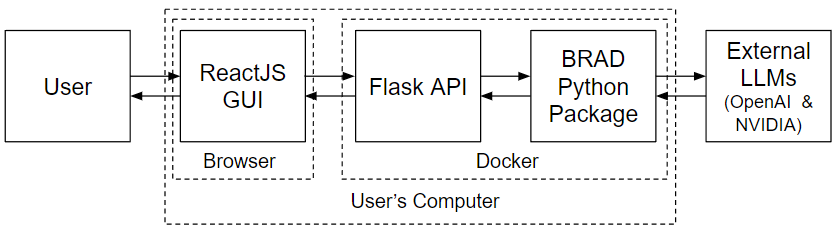
The GUI for BRAD uses the python package as a backend and deploys a local server with the following structure:
Backend: A Flask API that handles requests and communicates with the Python-based BRAD package.
Frontend: A React GUI that provides an interactive user interface for sending queries and displaying responses.
React GUI
The React frontend offers a graphical user interface for users to interact with the chatbot. Users can send messages, build RAG databases, or change the system configurations, which the frontend captures and sends to the Flask API. Upon receiving the chatbot’s response, the GUI updates the chat interface to display both user and bot messages, facilitating a smooth and engaging conversation experience.
Flask API
The Flask API serves as the backend, enabling communication between the Agent logic and the front-end React GUI. This API exposes the following endpoints:
sessions: These endpoints provide information about the open and previously created sessions.
databases: These endpoints allow the user to construct and modify different RAG databases.
configure: This endpoint allows the frontend to reset configuration variables of the Agent.
llm: These endpoints allow the frontend to change the LLM of the active Agent.
invoke: This endpoint queries the Agent class.
The API processes the messages using the logic in the Agent class and returns a response to the frontend.
Naming Conventions
The following conventions are used for writing a new endpoint:
Select one of the main ednpoints listed above
Select a secondary name such as: add, set, change, etc. or something descriptive to the endpoint task
- Define a method called <main endpoint>_<secondary name> that handles the logic
this is where the Agent class or server information can directly be manipulated
this method has a request aregument if it takes parameters (endpoint is POST)
this method has no parameters otherwise
this method requires detailed docstrings for the structure of the request and the response
- Define a method called ep_<main endpoint>_<secondary name>
accepts no arguments
returns <main endpoint>_<secondary name>
used to mount the logic to the Flast Blueprint
place this directly above the method <main endpoint>_<secondary name>
- Attach this method to the flask.Blueprint with the line:
@bp.route(“/<main endpoint>/<secondary name>”, methods=[‘POST’ or ‘GET’])
Below is an example for adding a generic ednpoint:
>>> @bp.route("/<main endpoint>/<secondary name>", methods=['POST' or 'GET'])
>>> def ep_<main endpoint>_<secondary name>():
>>>     return <main endpoint>_<secondary name>(request)
>>>
>>> def <main endpoint>_<secondary name>(request):
>>>     try:
>>>         # TODO: put endpoint logic here
>>>         response = jsonify(# TODO: put response variables here)
>>>         return response, 200
>>>     except:
>>>         response = jsonify(# TODO: put detailed error message)
>>>         return response, # TODO put error code
Endpoints
- BRAD.endpoints.configure_RAG_contextualCompression(request)[source]
Configure the contextual compression by the RAG system.
This endpoint updates the RAG (Retrieval-Augmented Generation) configuration to specify if contextual compression should be applied to each document.
Input Request Structure: The input request should be a JSON object with the following format: json
>>> {
>>>     "session": "/path/to/session/directory",
>>>     "contextual_compression": true
>>> }
session: (str) The file path to the session directory containing agent data.
contextual_compression: (bool) The value to set the contextual compression configuration.
Output Response Structure: The response will be a JSON object confirming the update:
>>> {
>>>     "message": "looks good"
>>> }
message: (str) Confirmation message indicating the operation was successful.
Error Handling: If the request is invalid or an error occurs during processing, the endpoint may return an error response: json
>>> {
>>>     "message": "Error message describing the issue"
>>> }
- Parameters:
request (flask.Request) – A Flask request object containing JSON data with session and number_articles.
- Returns:
A JSON response confirming the configuration update or an error message.
- Return type:
dict
- BRAD.endpoints.configure_RAG_numberArticles(request)[source]
Configure the number of articles retrieved by the RAG system.
This endpoint updates the RAG (Retrieval-Augmented Generation) configuration to specify the number of articles the system should retrieve. The new value is saved in the BRAD agent’s state and configuration file.
Input Request Structure: The input request should be a JSON object with the following format: json
>>> {
>>>     "session": "/path/to/session/directory",
>>>     "number_articles": 5
>>> }
session: (str) The file path to the session directory containing agent data.
number_articles: (int) The number of articles to be retrieved by the RAG system.
Output Response Structure: The response will be a JSON object confirming the update:
>>> {
>>>     "message": "looks good"
>>> }
message: (str) Confirmation message indicating the operation was successful.
Error Handling: If the request is invalid or an error occurs during processing, the endpoint may return an error response: json
>>> {
>>>     "message": "Error message describing the issue"
>>> }
- Parameters:
request (flask.Request) – A Flask request object containing JSON data with session and number_articles.
- Returns:
A JSON response confirming the configuration update or an error message.
- Return type:
dict
- BRAD.endpoints.configure_RAG_searchMechanism(request)[source]
Configure the retrieval method of the RAG system.
This endpoint updates the RAG (Retrieval-Augmented Generation) to set which retrieval method is used
Input Request Structure: The input request should be a JSON object with the following format: json
>>> {
>>>     "session": "/path/to/session/directory",
>>>     "search_method": <MMR, Similarity, Multi>
>>> }
session: (str) The file path to the session directory containing agent data.
search_method: (str) The search method to use.
Output Response Structure: The response will be a JSON object confirming the update:
>>> {
>>>     "message": "looks good"
>>> }
message: (str) Confirmation message indicating the operation was successful.
Error Handling: If the request is invalid or an error occurs during processing, the endpoint may return an error response: json
>>> {
>>>     "message": "Error message describing the issue"
>>> }
- Parameters:
request (flask.Request) – A Flask request object containing JSON data with session and number_articles.
- Returns:
A JSON response confirming the configuration update or an error message.
- Return type:
dict
- BRAD.endpoints.databases_available()[source]
Retrieve a list of available retrieval-augmented generation (RAG) databases.
This endpoint lists all available databases stored in the designated database folder. The function checks the folder for subdirectories, which represent the databases, and returns the list in JSON format. If no databases are found, the response includes “None” as the first entry in the list.
This is a GET request and does not require any parameters.
Example request:
>>> GET /databases/available
A JSON object is returned with the list of available databases. In case of errors (e.g., folder not found), an error message is returned.
Example success response:
>>> {
>>>     "databases": ["None", "database1", "database2"]
>>> }
Example error response (if folder is not found):
>>> {
>>>     "error": "Directory not found"
>>> }
- Returns:
A JSON response containing a list of available databases or an error message.
- Return type:
dict
- BRAD.endpoints.databases_create(request)[source]
Upload files and create a retrieval-augmented generation (RAG) database.
This endpoint allows users to upload multiple files, which are saved to the server. After the files are uploaded, a new folder is created, and the files are used to generate a RAG database.
Input Request Structure: The request should include a list of files (for database creation) and a form field specifying the database name:
The files are uploaded through the key “rag_files”.
The database name is provided in the form field “name”.
Example request format:
>>> POST /databases/create
>>> Form data:
>>> - name: "example_database"
>>> Files:
>>> - rag_files: file1.txt
>>> - rag_files: file2.txt
Output Response Structure: The response will return a JSON object with a message indicating the success or failure of the file uploads:
>>> {
>>>     "message": "File uploaded successfully"
>>> }
If no files were uploaded, the response will indicate an error:
>>> {
...     "message": "no uploaded file"
>>> }
- Parameters:
request (flask.Request) – A Flask request object that includes uploaded files and form data.
file_list (list) – A list of files uploaded through the request.
- Returns:
A JSON response indicating the success or failure of the file upload and database creation process.
- Return type:
dict
- BRAD.endpoints.databases_set(request)[source]
Set the active retrieval-augmented generation (RAG) database for the BRAD agent.
This uses the flask system cache to set the active database and llm hosts and updates it.
This endpoint allows users to select and set an available database from the server. The selected database will be loaded and set as the active RAG database for the BRAD agent. If “None” is selected, it will disconnect the current database.
Request Structure: The input should be a JSON object containing the name of the database to be set.
Example request:
>>> {
>>>     "database": "database_name"
>>> }
If the database name is “None”, the current RAG database will be disconnected.
Response Structure: A JSON response is returned indicating whether the database was successfully set or if an error occurred.
Example success response:
>>> {
>>>     "success": True,
>>>     "message": "Database set to database_name"
>>> }
Example response for disconnecting the database:
>>> {
>>>     "success": True,
>>>     "message": "Database set to None"
>>> }
Example error response (if the directory is not found):
>>> {
>>>     "error": "Directory not found"
>>> }
- Parameters:
request (flask.Request) – The HTTP POST request containing the database name in JSON format.
- Returns:
A JSON response with a success message or an error message.
- Return type:
dict
- BRAD.endpoints.initiate_start()[source]
Initializer method for important health checks before starting backend
- BRAD.endpoints.invoke(request)[source]
Invoke a query using the BRAD agent.
This function handles an incoming request from the user, extracts the message, and sends it to the BRAD agent for processing. It then returns a JSON response containing both the BRAD agent’s reply and the associated log stages.
Input Request Structure: The input request should be a JSON object with the following format: json
>>> {
>>>     "message": "Your query here"
>>> }
Output Response Structure: The response will be a JSON object containing the agent’s response and a log of the processing stages:
>>> {
>>>      "response": "Generated response from BRAD agent",
>>>      "response-log": {
>>>          "stage_1": "log entry for stage 1",
>>>          "stage_2": "log entry for stage 2",
>>>          ...
>>>      },
>>>      "llm-usage": {
>>>          "llm-calls": number of new llm calls,
>>>          "api-fees":  cost of api fees,
>>>      }
>>> }
- Parameters:
request (flask.Request) – A Flask request object containing JSON data with the user message.
- Returns:
A JSON response containing the agent’s reply and the log of query stages.
- Return type:
dict
- BRAD.endpoints.llm_apikey(request)[source]
Set the API key for the BRAD agent.
This endpoint allows users to provide an OPENAI or NVIDIA API key, which will be stored securely for use by the BRAD agent. The key can be used for authentication when accessing NVIDIA services.
Request Structure: The request must contain a JSON body with the following fields:
>>> {
>>>   "api-key": "str"  # The NVIDIA API key to be set
>>> }
nvidia-api-key (str): The NVIDIA API key to be set (Required).
Response Structure: On success, the response will contain:
>>> {
>>>   "message": "NVIDIA API key set successfully."
>>> }
On failure (missing API key), the response will contain:
>>> {
>>>   "message": "API key was not successfully set."
>>> }
- Parameters:
request_data (dict) – JSON data containing the NVIDIA API key.
nvidia_key (str) – The NVIDIA API key to be set.
- Returns:
A JSON response indicating the success or failure of setting the API key.
- Return type:
dict
- Raises:
ValueError – If no NVIDIA API key is provided.
Exception – For any other exceptions encountered during the process.
- BRAD.endpoints.llm_get()[source]
Get the available OpenAI LLM models.
This endpoint returns a list of possible LLM models that can be used.
Request Structure: The request must contain a JSON body with the following fields:
>>> GET /llm/get
Successful response example:
>>> {
>>>     "success": true,
>>>     "models": [
>>>         "model name 1",
>>>         "model name 1",
>>>         ...
>>>     ]
>>> }
- Returns:
A JSON response indicating success and the name of the active LLM.
- Return type:
dict
- BRAD.endpoints.llm_set(request)[source]
Set the language model (LLM) for the BRAD agent.
This endpoint allows users to specify which language model should be used by the BRAD agent and updates BRAD’s temperature low temperature -> higher confidence and low hallucination It updates the BRAD agent’s configuration and responds with the current LLM setting.
Request Structure: The request must contain a JSON body with the following fields:
>>> {
>>>   "llm": "str"  # The name of the LLM to set (e.g., "gpt-4", "bloom")
>>> }
llm (str): The name of the LLM to be used (Required).
Successful response example:
>>> {
>>>   "success": true,
>>>   "message": "LLM set to <llm_choice>"
>>> }
Error response example:
>>> {
>>>   "success": false,
>>>   "message": "Error message describing the failure if the LLM is missing or invalid"
>>> }
- Parameters:
model_name (str) – The name of the LLM to set.
- Returns:
A JSON response indicating success and the name of the active LLM.
- Return type:
dict
- Raises:
ValueError – If no model name is provided.
Exception – For any other exceptions encountered during execution.
- BRAD.endpoints.sessions_change(request)[source]
Change the active session to a specified session name.
This endpoint allows users to activate a specific session, making it the current working session. The session change involves saving the state of the current session, deleting the current agent, and activating the new session by loading its logs. The function returns the chat history display of the newly activated session.
Request: The request must be a POST request with a JSON body containing the session name.
- Example request:
>>> {
>>>     "message": "desired_session_name"
>>> }
Response: A JSON response will be returned with the following structure:
- Successful response example:
>>> {
>>>     "success": True,
>>>     "message": "Session 'desired_session_name' activated.",
>>>     "display": {
>>>         "history": "Extracted chat history for the activated session"
>>>     }
>>> }
- Error response example (when session is not found):
>>> {
>>>     "success": False,
>>>     "message": "Session 'desired_session_name' does not exist."
>>> }
- Error response example (permission error):
>>> {
>>>     "success": False,
>>>     "message": "Permission denied: PermissionError message"
>>> }
Exceptions: - ValueError: If no session name is provided in the request. - FileNotFoundError: If the specified session directory does not exist. - PermissionError: If there are permission issues while accessing or activating the session. - Exception: For any other general errors during execution.
- Parameters:
session_name (str) – The name of the session to activate.
- Returns:
A JSON response indicating success and the display of the activated session.
- Return type:
dict
- Raises:
ValueError – If no session name is provided.
FileNotFoundError – If the session directory does not exist.
PermissionError – If there are permission issues while activating the session.
Exception – For any other exceptions encountered during execution.
- BRAD.endpoints.sessions_create()[source]
Create a new chat session by resetting the current BRAD agent.
This function handles the creation of a new chat session by first saving the state of the current agent, deleting it, and then activating a new agent. The new session is initialized with tools specified in the global TOOL_MODULES. The function returns a JSON response indicating the success or failure of the operation.
Process:
Save the state of the current BRAD agent.
Delete the existing agent.
Instantiate a new BRAD agent with the specified tools.
Retrieve and display the chat history for the new session.
- Request:
>>> GET /sessions/create`
Response: A JSON response will be returned with the following structure:
- Successful response example:
>>> {
>>>     "success": True,
>>>     "message": "New session activated.",
>>>     "display": {
>>>         "history": "Extracted history logs for display"
>>>     }
>>> }
- Error response example:
>>> {
>>>     "success": False,
>>>     "message": "Error session"
>>> }
- Returns:
A JSON response indicating whether the session creation was successful or not.
- Return type:
tuple (flask.Response, int)
- Raises:
Exception – For any general errors encountered during the creation of the session.
- BRAD.endpoints.sessions_open()[source]
Retrieve a list of currently open chat sessions.
This endpoint allows the front end to access previously opened chat sessions. It returns a list of directories representing the open sessions.
Request:
>>> GET /sessions/open
- Successful response example:
>>> {
>>>     "open_sessions": ["session_1", "session_2", "session_3"]
>>> }
- Error response example:
>>> {
...     "error": "Directory not found"
>>> }
- Returns:
A JSON response containing the list of open session names.
- Return type:
dict
- Raises:
FileNotFoundError – If the directory for session storage is not found.
Exception – For any other exceptions encountered during execution.
- BRAD.endpoints.sessions_remove(request)[source]
Remove a specified open chat session.
This endpoint allows users to remove a previously opened chat session by its name. If the session exists, it will be deleted from the server.
- Example request:
>>> POST /sessions/remove
>>> {
>>>   "session_name": "my_chat_session"
>>> }
- On success, the response will contain:
>>> {
>>>   "success": true,
>>>   "message": "Session 'my_chat_session' removed."
>>> }
- On failure (e.g., session does not exist), the response will contain:
>>> {
>>>   "success": false,
>>>   "message": "Session 'my_chat_session' does not exist."
>>> }
- Parameters:
session_name (str) – The name of the session to be removed.
- Returns:
A JSON response indicating the success or failure of the removal.
- Return type:
dict
- Raises:
ValueError – If no session name is provided.
FileNotFoundError – If the session directory does not exist.
PermissionError – If there are permission issues while deleting the session.
Exception – For any other exceptions encountered during execution.
- BRAD.endpoints.sessions_rename(request)[source]
Rename an existing session to a new session name.
This function allows users to rename a session by updating the session’s directory and the agent’s chat log location. If the session to be renamed is not the currently active session, it activates the session first, then proceeds with renaming it. The chat history of the renamed session is returned upon success.
Request: The request must be a POST request with a JSON body containing the session’s current name and the desired updated name.
- Example request:
>>> {
>>>     "session_name": "old_session_name",
>>>     "updated_name": "new_session_name"
>>> }
Response: A JSON response will be returned with the following structure:
- Successful response example:
>>> {
>>>     "success": True,
>>>     "message": "Session 'old_session_name' renamed to 'new_session_name'.",
>>>     "display": {
>>>         "history": "Chat history for the renamed session"
>>>     }
>>> }
- Error response example (when session does not exist):
>>> {
>>>     "success": False,
>>>     "message": "Session 'old_session_name' does not exist."
>>> }
Exceptions: - ValueError: If the current or updated session name is not provided in the request. - FileNotFoundError: If the specified session directory does not exist. - PermissionError: If there are permission issues while renaming the session. - Exception: For any other general errors during execution.
- Returns:
A JSON response indicating success or failure, along with the chat history of the renamed session.
- Return type:
tuple (flask.Response, int)
- BRAD.endpoints.validate_database_name(database_name: str) str[source]
Validates and transforms a given string to ensure it conforms to specific rules for database collection names.
The function enforces the following rules: 1. The name must contain 3-63 characters. 2. It must start and end with an alphanumeric character (a-z, A-Z, 0-9). 3. It can only contain alphanumeric characters, underscores (_), hyphens (-), or periods (.). 4. It cannot contain two consecutive periods (..). 5. The resulting name is trimmed of leading and trailing whitespace and adjusted to fit the
length constraints, adding or removing characters as necessary.
- Parameters:
database_name (str) – The input string to validate and transform.
- Returns:
A valid database name that adheres to the specified constraints.
- Return type:
str
Configurations
Core Modules
The following modules are the “core” modules of BRAD. These modules contain methods that orchestrate the use of the LLM within modules, standardize logging throughout BRAD, or manage agentic workflows for BRAD.
Large Language Models
This module provides utilities for loading various language models, including OpenAI models, LLaMAs that run locally, or any model hosted on the NVIDIA NIM platform, for use within the BRAD framework. The module defines functions that facilitate the setup and initialization of these models by specifying key parameters such as model paths, API keys, and optional configurations like token limits and temperature. By default, a BRAD Agent will use OpenAI’s gpt-3.5-turbo-0125 model.
Available LLMs
The BRAD architecture is LLM agnostic and interoperable with different LLMs. For convenience, the following LLMs have been integrated into BRAD (1-3), but in prinicpal, any LLM could be used in this system
- OpenAI
The OpenAI API supports the use of gpt3, gpt-4o, and soon the o1 series of LLMs. To use these models, the user must (1) provide an OpenAI API key and (2) select an LLM
- NVIDA
NVIDIA hosts LLMs from a variety of providers to streamline using LLMs from a variety of providers. Currently, these include Llama models from META AI, Gemma from Google, Nemotron from NVIDIA, and other models from Microsft, Stability AI, Mistral AI, and more. To use these models, a user must supply an API key from NVIDIA.
- Llama with llama.cpp
A user can run LLM inference locally and integrate their LLM with BRAD. This is available directly for Llama models using the llama.cpp interface. Running models locally allows users to finetune their LLM of choice to be further customized for their usecase. This requires the user to have the hardward to support running LLM inference, independent of the BRAD architecture.
- Any LLM with LangChain
In principle, any LLM can be integrated into this system. To integrate a custom LLM or that from a different provider besides OpenAI or NVIDIA, the LLM must be made LangChain compatible. This can be done with minimal code, similar to the BradLLM class.
Loading LLMs
- BRAD.llms.load_llama(model_path='/nfs/turbo/umms-indikar/shared/projects/RAG/models/llama-2-7b-chat.Q8_0.gguf', n_ctx=4096, max_tokens=1000, temperature=0, verbose=False)[source]
Loads the Llama language model from the specified model path with given parameters.
- Parameters:
model_path (str, optional) – Path to the Llama model file.
n_ctx (int, optional) – Number of context tokens for the model.
max_tokens (int, optional) – Maximum number of tokens for the model’s output.
verbose (bool, optional) – If True, enables verbose logging.
- Returns:
The loaded Llama model.
- Return type:
langchain.llms.LlamaCpp
- Example:
>>> llama_model = load_llama()
- BRAD.llms.load_nvidia(model_name='meta/llama3-70b-instruct', nvidia_api_key=None, temperature=None)[source]
Loads the NVIDIA language model with the specified model name and API key.
- Parameters:
model_name (str, optional) – Name of the NVIDIA model to load.
nvidia_api_key (str, optional) – API key for accessing NVIDIA’s services. If not provided, it will be prompted.
temperature (float, optional) – temperature (i.e. creativity or randomness) of the llm
- Raises:
AssertionError – If the provided NVIDIA API key is not valid.
- Returns:
The loaded NVIDIA language model.
- Return type:
langchain_nvidia_ai_endpoints.ChatNVIDIA
- Example:
>>> nvidia_model = load_nvidia()
- BRAD.llms.load_openai(model_name='gpt-3.5-turbo-0125', api_key=None, temperature=0)[source]
Loads the OPENAI language model with the specified model name and API key.
- Parameters:
model_name (str, optional) – Name of the OPENAI model to load.
api_key (str, optional) – API key for accessing OPENAI’s services. If not provided, it will be prompted.
temperature (float, optional (default 0)) – temperature (i.e. creativity or randomness) of the llm
- Raises:
AssertionError – If the provided OPENAI API key is not valid.
- Returns:
The loaded OPENAI language model.
- Return type:
langchain_openai.ChatOpenAI
- Example:
>>> openai_model = load_openai()
Logging
This module provides utilities for logging and tracking chat processes and interactions within the BRAD framework. It includes functions to record the agent state, LLM calls, file loading, debug information, and user-facing outputs, and other pieces of information to ensure consistent and transparent monitoring of the Agent and user interactions. These logging methods should be inserted throughout the code for development, debugging, and user-facing output. Log files are automatically saved in the output directory.
Log Format
Logs capture user interactions and actions taken by an Agent. These logs are saved in the output directory and can be reviewed for debugging or analysis purposes. Within the log record, entries are numbered according to their order in the chat. For a single entry, the following items are recorded:
time: the time when the Agent responds to this query
prompt: the input prompt from the user
output: the message displayed to the user
status: the Agent state after responding to the user (See State Schema)
process: this records the tool module and the set of particular steps the Agent takes using the tool
planned: a list of any steps that Agent plans to take
These items are saved in the following schema:
>>> [
...     0: {
...         'TIME'   : <time stamp>,
...         'PROMPT' : <input from the user or preplanned prompt>,
...         'OUTPUT' : <output displayed to the user>,
...         'STATUS' : {
...                 'LLM' : <primary large language model being used>,
...                 'Databases' : {
...                         'RAG' : <primary data base>,
...                         <other databases>: <more databases can be added>,
...                         ...
...                     },
...                 'config' : {
...                         'debug' : True,
...                         'output-directory' : <path to output directory>,
...                         ...
...                     }
...             },
...         'PROCESS' : {
...                 'MODULE' : <name of module i.e. RAG, DATABASE, CODER, etc.>
...                 'STEPS' [
...                         # information for a particular step involved in executing the module. Some examples
...                         {
...                            'func' : 'rag.retreival',
...                            'num articles retrieved' : 10,
...                            'multiquery' : True,
...                            'compression' : True,
...                         },
...                         {
...                            'LLM' : <language model>,
...                            'prompt template' : <prompt template>,
...                            'model input' : <input to model>,
...                            'model output' : <output of model>
...                         }
...                     ]
...             },
...         'PLANNED' : [
...                 <Next prompt in queue>,
...                 ...
...             ]
...     },
... 1 : {
...         'TIME'   : <time stamp>,
...         'PROMPT' : <second prompt>,
...         ...
...     },
... ...
>>> ]
Log Methods
The methods in the log module serve three key functions:
Saving information to the log file.
Ensuring consistency in how data is recorded within the steps section of the log (e.g., all LLM calls follow a uniform format).
Displaying output, warnings, and error messages to the user.
The following methods are available:
- BRAD.log.debugLog(output, state=None, display=None)[source]
Records debug information to a log file and optionally displays messages to the user based on the system’s debug settings.
This function is used to capture and report errors or other important debug information. It checks the current debug configuration and either writes the log to a file or displays it to the user, ensuring flexibility in managing debug output.
- Parameters:
output (str) – The message or error to be logged. This can be any information that needs to be saved for debugging or tracking purposes.
state (dict, optional) – The current state of the system, containing configuration details, including whether debug logging is enabled. This is used to determine whether to log the output.
display (bool, optional) – If set to True, the output will be displayed to the user regardless of the debug configuration. If False or not provided, the function will refer to the debug setting in state[‘config’][‘debug’].
- Raises:
KeyError – If state[‘config’][‘debug’] is not found when display is None.
- Note:
Debug logs are saved using Python’s logging library, and the output format includes timestamps and logging levels. If display is enabled or debug mode is active, the output will be shown to the user. Otherwise, it will be silently logged to the configured log file.
- BRAD.log.errorLog(errorMessage, info=None, state=None)[source]
Logs an error message and related information to the log file and updates the process steps in the system’s state.
This function is designed to log errors that occur during the operation of the BRAD framework. It records the error message in the log file with a timestamp, and if provided, additional information (info) can be logged as well. The error is also appended to the state[‘process’][‘steps’] list for tracking in the system’s state.
- Parameters:
errorMessage (str) – The error message to be logged. This is a string that describes the nature of the error.
info (any, optional) – Optional additional information related to the error. This can provide context or further details about the error, such as relevant variables or states at the time of the error.
state (dict, optional) – The current system state, which contains information about the chat process and tracks the progression of steps. The error and related information will be appended to state[‘process’][‘steps’].
- Raises:
KeyError – If state[‘process’][‘steps’] is not found, meaning the state has not been properly initialized for logging steps.
- Note:
The error is logged using Python’s logging library, which outputs the error message with a timestamp and logging level. Additionally, the error is tracked within the state object for review and debugging purposes. Make sure that state[‘process’][‘steps’] is correctly initialized before calling this function.
- BRAD.log.is_json_serializable(value)[source]
Determines whether a given value can be serialized into a valid JSON format.
This function checks if the provided value can be safely converted to JSON. It is useful for ensuring that data, especially when dealing with logs or state information, can be stored in JSON format without errors. The function handles common data types and catches serialization errors for non-compatible types.
- Parameters:
value (Any) – The data to be evaluated for JSON serializability. This can be any Python object.
- Returns:
Returns True if the value can be serialized to JSON. Returns False if the value raises a TypeError or OverflowError when attempting serialization.
- Return type:
bool
- Raises:
TypeError – If the value is of a type that cannot be serialized (e.g., custom objects, functions).
OverflowError – If the value exceeds the limits of what JSON can represent (e.g., extremely large numbers).
- Note:
Lists are treated as JSON serializable by default. For other complex types like dictionaries, sets, or custom objects, serialization will depend on the specific structure and contents.
- BRAD.log.llmCallLog(llm=None, memory=None, prompt=None, input=None, output=None, parsedOutput=None, apiInfo=None, purpose=None)[source]
Logs the information for each LLM call, capturing relevant details for tracking and debugging. This can include both raw and processed outputs, as well as the context of the call.
- Parameters:
llm (str, optional) – The identifier or name of the LLM used in the call (e.g., GPT-3, GPT-4, etc.). If not provided, it defaults to None.
memory (object, optional) – A memory object that tracks the conversational history or state associated with the LLM call. This could be a representation of past interactions or context shared between the user and LLM.
prompt (str, optional) – The template or content used to prompt the LLM. This can be a system prompt or a structured input that guides the LLM in generating a response.
input (str, optional) – The full input provided to the LLM, which includes both the prompt and any additional context or parameters. This represents the complete information sent to the model for processing.
output (str, optional) – The complete output returned by the LLM. This may contain large amounts of text or data generated by the model in response to the input.
parsedOutput (any, optional) – The processed or parsed output that is actually used or displayed. This can be a subset or reformatted version of the full LLM output, focusing on the most relevant information.
apiInfo (dict, optional) – The callback information regarding LLM api utilization and fees
purpose (str, optional) – A description of the purpose of the LLM call. This field explains why the LLM was called and what task or goal the call is intended to achieve (e.g., generate response, extract information).
- Returns:
A dictionary containing the logged information for the LLM call, including the LLM name, memory, prompt, input, output, parsedOutput, and purpose.
- Return type:
dict
- Note:
Callback information from OpenAI or NVIDIA APIs can be saved in the output field, which contains the full output produced by the LLM. The parsedOutput should contain only the information used by BRAD or displayed to the user.
- BRAD.log.loadFileLog(file=None, delimiter=None)[source]
Logs and returns information about a file that has been loaded into the system. This function captures details such as the file name and the delimiter used to parse the file.
The logged information is returned as a dictionary, making it easy to track and review the file loading process during later stages, such as debugging or auditing the steps involved in data processing.
- Parameters:
file (str, optional) – The name or path of the file being loaded. If not provided, it defaults to None.
delimiter (str, optional) – The delimiter used to parse the file (e.g., commas for CSV files). If not specified, it defaults to None.
- Returns:
A dictionary containing: - file: The name or path of the file (as a string). - delimiter: The delimiter used in the file (as a string).
- Return type:
dict
- Note:
This function can be useful for logging metadata about files loaded into the system, especially when working with various file formats that may require different parsing strategies.
- BRAD.log.logger(chatlog, state, chatname, elapsed_time=None)[source]
This methods writes the lof of the current chat status, user inputs, outputs, and process details to a specified file.
The function serializes the chat data, including user inputs, outputs, process information, and the current Agent state. The resulting log is written to a file specified by chatname.
- Parameters:
chatlog (dict) – A dictionary containing the chat log entries. Each entry is a record of a specific chat interaction.
state (dict) – The current status of the chat, including details like the user’s prompt, the system’s output, process information, and other contextual information (e.g., databases, queue).
chatname (str) – The filename (including path) where the chat log will be saved. The file will be created or overwritten if it already exists.
elapsed_time (float or None, optional) – Optional. The time elapsed since the start of the chat or a specific reference point. If not provided, it defaults to None.
- Raises:
FileNotFoundError – If the specified chat log file cannot be created or accessed.
TypeError – If the chat log or status contains non-serializable data that cannot be converted to a string.
- Returns:
A tuple containing: - chatlog: The updated chat log with the new entry. - state: The current state of the system after logging.
- Return type:
tuple
- Note:
The log is saved in JSON format with proper indentation to improve readability. Non-serializable data within the chat state (e.g., dataframes) is converted to string format to ensure proper logging.
- BRAD.log.userOutput(output, state=None)[source]
Standardizes and manages the display of information to the user, while also logging the output.
This method is responsible for both printing messages directly to the user and saving the output to the Agent.state for logging purposes. It ensures that the displayed output is consistently tracked and appended to the system’s state for future reference, debugging, or record-keeping.
- Parameters:
output (str) – The message or information to be displayed to the user. This can be any printable string or data that the user should see.
state (dict, optional) – The current system state, which tracks the chat process and logs the output. If state[‘output’] is not initialized, this method will set it to the given output. If it is already initialized, the method appends the new output to the existing log.
- Returns:
The updated state object with the latest output appended.
- Return type:
dict
- Raises:
KeyError – If the state is not initialized properly or lacks an ‘output’ key, this method attempts to create or update the ‘output’ field within the state object.
- Note:
This is the only method in the BRAD framework that directly displays output to the user. The logs are saved in the state object to track all output communications, ensuring a record is available for debugging or review. Make sure that the state is correctly initialized before calling this method.
Utilities
This module provides a set of utility functions designed to streamline common tasks related to file management, data handling, directory operations, and more across the core and tool modules.
Scope
The goal of this module is to offer a reusable, general-purpose utilities that simplify routine tasks that interface the LLM with other aspects of the code. These tasks include saving and loading files, ensuring directories exist, generating standardized file paths, and more. Each function is designed to abstract repetitive operations and enhance code clarity, maintainability, and reliability. The functions in this module can be imported as needed when building different aspects of the BRAD framework.
Available Methods
This module contains the following methods:
- BRAD.utils.add_output_file_path_to_string(string, state)[source]
Modifies the given string to include the appropriate file paths for any files previously generated by BRAD. If a file from the generated files list is found in the string, and it is not immediately preceded by the append path, the function inserts the append path before the file name.
- Parameters:
string (str) – The input string to be modified.
state (dict) – A dictionary containing chat status information, including ‘output-path’ and a function outputFiles that returns a list of generated file names.
- Returns:
The modified string with appropriate file paths included.
- Return type:
str
- BRAD.utils.compile_latex_to_pdf(state, tex_file)[source]
Compile a LaTeX (.tex) file into a PDF using pdflatex.
This function compiles a LaTeX file into a PDF by running pdflatex command with the specified output directory.
- Parameters:
state (dict) – The dictionary containing the current status and configuration of the chat, including the output directory.
tex_file (str) – The filename of the LaTeX file (including the .tex extension) to compile.
- Returns:
Updated state dictionary after attempting to compile the LaTeX file.
- Return type:
dict
- Raises:
FileNotFoundError – If the specified LaTeX file does not exist.
- BRAD.utils.ensure_directory_exists(file_path, state)[source]
Ensure that the directory for a given file path exists, creating it if necessary.
This function checks if the directory path for the provided file_path exists. If the directory does not exist, it creates the directory. It prints a message indicating whether the directory was created or if it already existed.
- Parameters:
file_path (str) – The full file path for which the directory needs to be checked/created.
- BRAD.utils.fieldSelectorFromDataFrame(state, df)[source]
Selects a field from a DataFrame using a language model prompt.
This function uses a language model to select a specific field from the columns of a given DataFrame. It builds a prompt with the available columns, invokes the language model, and parses the response to determine the selected field.
- Parameters:
state (dict) – A dictionary containing the chat status and configuration details. It must include the keys ‘llm’, ‘prompt’, and ‘process’.
df (pandas.DataFrame) – The DataFrame from which a field will be selected.
- Returns:
Updated state dictionary and the selected field as a string.
- Return type:
tuple
- BRAD.utils.loadFromFile(state)[source]
Loads data from a file selected by an LLM prompt based on user input.
This function interacts with a language model to select a file from available files in the output directory. It extracts the specified fields from the selected file and returns the data along with updated chat status.
- Parameters:
state (dict) – A dictionary containing the chat status and configuration details. It must include the keys ‘prompt’, ‘llm’, and ‘output-directory’.
- Returns:
Updated state dictionary and a list of values from the specified fields in the file.
- Return type:
tuple
- BRAD.utils.load_file_to_dataframe(filename)[source]
Load a file into a Pandas DataFrame based on its extension.
This function reads a CSV or TSV file into a Pandas DataFrame based on the file extension.
- Parameters:
(str) (filename)
- Returns:
pd.DataFrame or None
- Return type:
The loaded DataFrame if successful, or None if the file extension is not supported.
- BRAD.utils.makeNamesConsistent(state, files)[source]
Ensure filenames in the output directory are consistent with the pipeline stage numbering.
This function renames files in the output directory to include the current stage number from the pipeline. If a file’s name does not start with ‘S’, it will be prefixed with the stage number. Additionally, it removes any ‘/’ or ‘' characters from filenames.
- Parameters:
state (dict) – A dictionary containing the chat status and configuration details. It must include the keys ‘queue’ and ‘output-directory’.
files (list) – A list of filenames to be processed.
- Returns:
Updated state with renamed files logged in ‘process’ steps.
- Return type:
dict
- BRAD.utils.outputFiles(state)[source]
Retrieve a list of all files in the output directory.
This function lists all files present in the output-directory specified in the state dictionary and returns them as a list.
- Parameters:
state (dict) – A dictionary containing the chat status and configuration details. It must include the key ‘output-directory’.
- Returns:
A list of filenames present in the output directory.
- Return type:
list
- BRAD.utils.outputFromPriorStep(state, step, values=None)[source]
Retrieve the output from a prior step in the pipeline.
Warning
We may be removing this function soon.
This function searches for and loads the output file corresponding to a specified step in the pipeline. If the file is a CSV, it loads the data into a DataFrame. Optionally, specific columns can be selected from the DataFrame.
- Parameters:
state (dict) – The dictionary containing the current status and configuration of the chat, including the output directory.
step (str) – The step number as a string to identify the specific output file.
values (list, optional) – A list of column names to select from the DataFrame. If None, all columns are returned.
- Returns:
The DataFrame containing the data from the output file of the specified step. If specific columns are provided, only those columns are included.
- Return type:
pandas.DataFrame
- BRAD.utils.pdfDownloadPath(state)[source]
Generate the file path for downloading PDF files.
This function constructs the file path for downloading PDF files based on the output-directory specified in the state dictionary. It appends ‘pdf’ to the output directory path to indicate the location where PDF files should be saved.
- Parameters:
state (dict) – A dictionary containing the chat status and configuration details. It must include the key ‘output-directory’.
- Returns:
The complete file path for downloading PDF files.
- Return type:
str
- BRAD.utils.save(state, data, name)[source]
Save data to a specified output directory, with optional stage number prefix.
This function saves the provided data to a specified output directory within the state configuration. If the state is part of a pipeline, it prefixes the filename with the current stage number.
- Parameters:
state (dict) – A dictionary containing the current chat status, including queued pipeline stages and output directory.
data (pd.DataFrame or str) – The data to be saved. It can be either a pandas DataFrame (for CSV output) or a string (for .tex output).
name (str) – The name of the output file.
- Returns:
The updated state dictionary with information about the saved file.
- Return type:
dict
- Raises:
ValueError – If the data type is not a DataFrame for CSV or a string for .tex files.
- BRAD.utils.savefig(state, ax, name)[source]
Save a matplotlib figure to a specified output directory, with optional stage number prefix.
This function saves the provided matplotlib axis (ax) as a figure to a specified output directory within the state configuration. If the state is part of a pipeline, it prefixes the filename with the current stage number.
- Parameters:
state (dict) – A dictionary containing the current chat status, including queued pipeline stages and output directory.
ax (matplotlib.axes.Axes) – The matplotlib axis object containing the figure to be saved.
name (str) – The name of the output file.
- Returns:
The updated state dictionary with information about the saved file.
- Return type:
dict
- BRAD.utils.word_similarity(word1, word2)[source]
Calculate the similarity ratio between two words using SequenceMatcher.
This function computes the similarity ratio between two input words. The ratio is calculated based on the longest contiguous matching subsequence between the two words using the difflib.SequenceMatcher from the Python standard library.
- Parameters:
word1 (str) – The first word to compare.
word2 (str) – The second word to compare.
- Returns:
A float value between 0 and 1 representing the similarity ratio. A value of 1.0 means the words are identical, while 0.0 means they are completely different.
- Return type:
(float)
Planner
This module provides functions for generating and managing agentic workflows or pipelines with multiple steps each to be executed by individual tool modules. The main method, planner, builds pipelines based on user input and the available modules. It also supports selecting pre-existing pipelines or designing new ones when necessary.
- BRAD.planner.displayPipeline2User(process, state=None)[source]
Displays the steps of the process pipeline to the user, logging each step.
This function iterates through the steps of a process pipeline, outputs each step to the user in a standardized format, and updates the chat status with the logged outputs. Each step is labeled as Step X, where X is the key, followed by the corresponding value of the process step.
- Parameters:
process (dict) – A dictionary representing the process pipeline. Each key-value pair corresponds to a step in the process, where the key is the step number or name, and the value is the step’s description or details.
state (dict, optional) – The current chat status dictionary to which the output will be appended. If not provided, a default value of None is used.
- Returns:
The updated chat status after logging all process steps.
- Return type:
dict
- BRAD.planner.getKnownPipelines(state)[source]
This function reads all available pipeline JSON files in the ‘pipelines’ directory and extracts their ‘name’ and ‘description’ fields. It formulates a summary string that can be used as input to an LLM prompt for selecting the appropriate pipeline.
- Returns:
- A tuple containing two elements:
pipelines (list): A list of dictionaries where each dictionary represents a pipeline read from a JSON file.
summary (str): A formatted string summarizing the ‘name’ and ‘description’ of each pipeline.
- Return type:
tuple
- BRAD.planner.planner(state)[source]
Generates a plan based on the user prompt using a language model, allows the user to review and edit the plan, and then updates the state with the finalized plan.
- Parameters:
state (dict) – A dictionary containing the LLM, user prompt, vector database, memory, and configuration settings for the planning process.
- Returns:
- The updated state containing the finalized plan and any modifications
made during the process.
- Return type:
dict
- BRAD.planner.response2processes(response)[source]
Converts a response string into a list of processes, each with an order, module, prompt, and description. It identifies modules from a predefined list and parses the response into steps based on these modules.
- Parameters:
response (str) – The response string containing the steps and corresponding details.
- Returns:
- A list of dictionaries, each representing a process with the following keys:
’order’: The order of the process.
’module’: The module associated with the process.
’prompt’: The prompt to invoke the process.
’description’: A description of the process.
- Return type:
list
Example
>>> response = '''
... **Step 1: RAG**
... Prompt: Retrieve documents related to AI research
... **Step 2: SCRAPE**
... Prompt: Scrape data from the specified website
... '''
>>> processes = response2processes(response)
>>> print(processes)
[
    {
        'order': 0,
        'module': 'PLANNER',
        'prompt': None,
        'description': 'This step designed the plan. It is placed in the queue because we needed a placeholder for 0-indexed lists.',
    },
    {
        'order': 1,
        'module': 'RAG',
        'prompt': '/force RAG Retrieve documents related to AI research',
        'description': '**Step 1: RAG\nPrompt: Retrieve documents related to AI research\n',
    },
    {
        'order': 2,
        'module': 'SCRAPE',
        'prompt': '/force SCRAPE Scrape data from the specified website',
        'description': '**Step 2: SCRAPE\nPrompt: Scrape data from the specified website\n',
    }
]
Routing
This module manages routing decisions for both individual user inputs and agentic workflows using the semantic_router library.
Scope
It serves two key purposes within the BRAD framework: determining which tool or module to use for a specific input, and orchestrating multi-step workflows by selecting the next stage in the process.
Tool Selection for Single Inputs: When receiving input from a user, the router evaluates the context and selects the appropriate tool or module to handle the input. This ensures that the most suitable functionality is used to process each user request, improving the efficiency and accuracy of interactions. Semantic routing is used for this level or organization, and the routing database may be dynamically updated as more user queries are recieved.
Agentic Workflow Management: For agent-driven processes, the router manages the progression of tasks in a predefined workflow designed by the planner. It selects the next step based on the current state and the broader workflow plan, ensuring smooth transitions between stages. This feature is organized by the LLM and is essential for workflows that involve multiple steps, tools, or decision points.
Available Methods
This module contains the following methods:
- BRAD.router.add_sentence(file_path, sentence)[source]
Adds a new sentence to the specified text file. These files contain user inputs associated with tool modules.
- Parameters:
file_path (str) – The path to the text file where the sentence is to be added.
sentence (str) – The sentence to be added to the text file.
- Raises:
FileNotFoundError – If the specified file does not exist or cannot be created.
- BRAD.router.buildRoutes(prompt)[source]
Constructs routes based on the provided prompt and updates the corresponding text files with the new prompts.
This function processes the input prompt to identify specific commands (e.g., /force) and builds a new prompt that is then appended to the designated router text file based on the identified route. Each command maps to a specific file, and if the command is not recognized, a KeyError will be raised.
- Parameters:
prompt (str) – The prompt containing the information to be added to the router.
- Raises:
KeyError – If the specified route is not found in the paths dictionary.
- BRAD.router.getRouter(available=None)[source]
Constructs a semantic router layer configured to determine the correct tool module for user queries. This routing layer uses the routing files and previously used user inputs as data to predict which tool module to use. These routing files are updated over time.
- Parameters:
available (list, optional) – list of avaialble modules. If available is None, then all modules are available by default.
- Returns:
A router layer configured with predefined routes for tasks such as querying Enrichr, web scraping, and generating tables.
- Return type:
RouteLayer
- BRAD.router.getRouterPath(file)[source]
Constructs and returns the absolute path to a file located in the ‘routers’ directory.
This function determines the current script’s directory and constructs the absolute path to a specified file within the ‘routers’ subdirectory.
- Parameters:
file (str) – The name of the file whose path is to be constructed.
- Returns:
The absolute path to the specified file in the ‘routers’ directory.
- Return type:
str
- BRAD.router.read_prompts(file_path)[source]
Reads a text file where each line contains a sentence and returns a list of non-empty sentences. The files contain previously used user inputs associated with tool modules.
This function opens the specified text file, reads each line, and returns a list containing the sentences. Leading and trailing whitespace is removed from each line, and empty lines are ignored.
- Parameters:
file_path (str) – The path to the text file to be read.
- Raises:
FileNotFoundError – If the specified file cannot be found.
- Returns:
A list of non-empty sentences extracted from the text file.
- Return type:
list[str]
- BRAD.router.reroute(state)[source]
Reroutes the conversation flow for agentic workflows based on the current queue pointer and the user prompt.
This method uses the agent history and ongoing conversation, along with an LLM, to determine the subsequent step in the agentic workflow designed by the planner.
- Parameters:
state – A dictionary that holds the current state of the conversation, including the language model, the user prompt, the process queue, and any other relevant information necessary for effectively rerouting the conversation.
- Returns:
An updated state dictionary reflecting changes made during the rerouting process.
- Return type:
dict
Prompt Templates
This module organizes all templates for inputing the conversation, user inputs, documents, file selection, or other information into an LLM throughout BRAD. Each method returns a single template, in the form of a string, that contains spaces for designed keywords to be filled in with the appropriate information.
Tool Modules
The following modules are the “tool” modules of BRAD. These modules contain methods that orchestrate the use of the LLM with different databases, software, or information accessible to the BRAD agents.
Lab Notebook
This module implements functions to facilitate Retrieval Augmented Generation (RAG), which combines the strengths of document retrieval and language model generation to enhance the user’s experience with rich, contextually relevant responses.
Key Functions
- queryDocs:
Queries documents based on a user prompt and updates the chat status with the results. This function handles the retrieval of relevant documents from a vector database, applies contextual compression, reranks the documents if required, and invokes the language model to generate a response based on the retrieved documents. It also logs the interaction and displays the sources of the information.
- create_database:
Constructs a database of papers that can be used by the RAG pipeline in BRAD. This method requires a single directory of papers, books, or other pdf documents. This method should be used directly, outside of and prior to constructing an instance of the Agent class. Once a database is constructed, documents can be added or removed, and the database will persist on the local disk so that it only needs to be constructed once.
There are several supporting methods as well.
Available Methods
This module contains the following methods:
- BRAD.rag.adj_matrix_builder(docs, state)[source]
Build an adjacency matrix based on cosine similarity between a prompt and document content.
- Parameters:
docs (list) – A list of documents or pages (objects) from which to build the adjacency matrix.
state (dict) – A dictionary containing information about the chat status and configuration, including ‘prompt’, ‘config’, and ‘num_articles_retrieved’.
- Returns:
A 2D numpy array representing the adjacency matrix, where each element at position (i, j) indicates the similarity score between documents i and j.
- Return type:
np.ndarray
- BRAD.rag.best_match(prompt, title_list)[source]
Find the best matching title from the list based on cosine similarity with a given prompt.
Parameters: - prompt (str): The prompt or query to find the best match for. - title_list (list): A list of titles (strings) to compare against the prompt.
Returns: - best_title (str): The title from title_list that best matches the prompt. - best_score (float): The cosine similarity score of the best matching title with the prompt.
- BRAD.rag.contextual_compression(docs, state)[source]
Summarizes the content of documents based on a user query, updating the document search results with these summaries.
- Parameters:
docs (list) – A list of documents where each document has an attribute page_content containing the text content of the document.
state (dict) – BRAD state used to track debuging
- Returns:
- The modified documentSearch list with updated page_content for each
document, replaced by their summaries.
- Return type:
list
- BRAD.rag.create_database(docsPath='papers/', dbName='database', dbPath='databases/', HuggingFaceEmbeddingsModel='BAAI/bge-base-en-v1.5', chunk_size=[700], chunk_overlap=[200], v=False)[source]
Create a Chroma database from PDF documents.
- Parameters:
docsPath (str, optional) – Path where the document files are located. Default is ‘/nfs/turbo/umms-indikar/shared/projects/RAG/papers/’.
dbName (str, optional) – Name of the database to create. Default is None.
dbPath (str, optional) – Path where the database will be saved. Default is ‘/nfs/turbo/umms-indikar/shared/projects/RAG/databases/’.
HuggingFaceEmbeddingsModel (str, optional) – Model name for HuggingFace embeddings. Default is ‘BAAI/bge-base-en-v1.5’.
chunk_size (list, optional) – List of chunk sizes for splitting documents. Default is [700].
chunk_overlap (list, optional) – List of chunk overlaps for splitting documents. Default is [200].
v (bool, optional) – Verbose mode. If True, print progress messages. Default is False.
- BRAD.rag.cut(state, vectordb)[source]
Remove documents from a vector database based on a relative frequency threshold of a specific character.
- Parameters:
state (dict) – A dictionary containing chat status information, including the relative frequency threshold for the character and other contextual details related to the ongoing conversation.
vectordb – An object representing the vector database, which provides methods for fetching and deleting documents based on certain criteria, including relative frequency.
- Returns:
The updated vector database object after removing documents that exceed the specified relative frequency threshold for the character.
- BRAD.rag.documentEnrichment(docs, state)[source]
Enhances the input list of documents by retrieving additional text chunks from the same source and page, ensuring no duplicate entries are added.
This function searches through a vector database (vectordb) to find more text that is related to the documents in the input docs list. It retrieves all document chunks from the same file and page that were found during the first retrieval. Duplicate text chunks are avoided by maintaining a set of already seen texts.
- Parameters:
docs (list) – A list of langchain_core.documents.base.Document objects. Each Document contains metadata, including ‘source’ and ‘page’, and page_content, which holds the text content.
state (dict) – The Agent.state containing the RAG database
- Returns:
- A list of enriched Document objects. These are constructed from
the additional text chunks found on the same page and source as the originally retrieved documents. The list will only contain unique documents to avoid duplication.
- Return type:
list
Notes
This function assumes that the vectordb object has a method get() that returns a dictionary with keys: ‘metadatas’ and ‘documents’. The ‘metadatas’ key contains metadata for each document chunk, including its source and page. The ‘documents’ key contains the text content.
The function prevents duplication of text chunks by using a set to track previously added texts.
- BRAD.rag.getDocumentSimilarity(documents)[source]
Extracts documents and their similarity scores from a list of document-score pairs.
- Parameters:
documents (list) – A list of tuples where each tuple contains a document object and its similarity score.
- Returns:
A tuple containing two elements: - A list of langchain_core.documents.base.Document document objects. - A numpy array of similarity scores.
- Return type:
tuple
- BRAD.rag.getInputDocumentJSONs(input_documents)[source]
Converts a list of input documents into a JSON serializable dictionary format.
- Parameters:
input_documents (list) – A list of document objects containing page content and metadata.
- Returns:
A dictionary where keys are indices and values are JSON serializable representations of the input documents.
- Return type:
dict
- BRAD.rag.getPreviousInput(log, key)[source]
Warning
This method will be removed soon.
Retrieves previous input or output from the log based on the specified key.
- Parameters:
log (list) – A list containing the chat log or history of interactions.
key (str) – A string key indicating which previous input or output to retrieve.
- Raises:
IndexError – If the specified index is out of bounds in the log.
KeyError – If the specified key is not found in the log entry.
- Returns:
The previous input or output corresponding to the specified key.
- Return type:
str
- BRAD.rag.get_all_sources(vectordb, prompt, path)[source]
Retrieve sources from the vector database based on a prompt and path, and filter the results according to the prompt.
- Parameters:
vectordb (object) – The vector database object containing metadata and sources for retrieval.
prompt (str) – The prompt or query used to filter the sources retrieved from the vector database.
path (str) – The path used to filter and clean source file paths, ensuring consistency and relevance in the results.
- Returns:
A tuple containing: - real_source_list: A list of cleaned and filtered source names that match the given prompt. - filtered_ids: A list of IDs corresponding to the filtered sources based on the prompt.
- Return type:
tuple
- BRAD.rag.get_wordnet_pos(word)[source]
Warning
This function may be removed in the near future.
Gets the WordNet part of speech (POS) tag for a given word.
- Parameters:
word (str) – The word for which to retrieve the POS tag.
- Returns:
The WordNet POS tag corresponding to the given word. Defaults to noun if no specific tag is found.
- Return type:
str
- BRAD.rag.normalize_adjacency_matrix(A)[source]
Normalize an adjacency matrix by dividing each element by the sum of its column.
- Parameters:
A (np.ndarray) – Input adjacency matrix to be normalized, where each element (i, j) represents the weight of the edge from node i to node j.
- Returns:
Normalized adjacency matrix where each element at position (i, j) is divided by the sum of the j-th column of the original matrix A. This normalization ensures that the columns of the resulting matrix sum to 1, facilitating interpretation as probabilities or relative weights.
- Return type:
np.ndarray
- BRAD.rag.pagerank_rerank(docs, state)[source]
Rerank a list of documents based on their PageRank scores computed from an adjacency matrix.
- Parameters:
docs (list) – List of documents or pages to be reranked, where each document is represented as an object containing relevant information for scoring.
state (dict) – A dictionary containing information about the chat status and configuration, including parameters for building the adjacency matrix, such as the ‘num_articles_retrieved’ and ‘config’ settings.
- Returns:
A reranked list of documents based on their PageRank scores, ordered from highest to lowest score, reflecting the importance of each document in the context of the provided adjacency matrix.
- Return type:
list
- BRAD.rag.pagerank_weighted(A, alpha=0.85, tol=1e-06, max_iter=100)[source]
Calculate the PageRank vector for a weighted adjacency matrix A using the power iteration method.
- Parameters:
A (np.ndarray) – Weighted adjacency matrix representing the graph structure, where each element (i, j) indicates the weight of the edge from node i to node j.
alpha (float, optional) – Damping factor for the PageRank calculation, which controls the probability of following an outgoing link versus randomly jumping to any node (default is 0.85).
tol (float, optional) – Tolerance threshold for convergence, determining the acceptable difference between successive PageRank vectors (default is 1e-6).
max_iter (int, optional) – Maximum number of iterations for the power method, limiting the computation to ensure it does not run indefinitely (default is 100).
- Returns:
PageRank vector representing the importance score of each node in the graph, where higher scores indicate greater importance or influence within the network.
- Return type:
np.ndarray
- BRAD.rag.queryDocs(state)[source]
Queries documents based on the user prompt and updates the chat status with the results.
- Parameters:
state (dict) – A dictionary containing the current chat status, including the prompt, LLM, vector database, and memory.
- Raises:
KeyError – If required keys are not found in the state dictionary.
AttributeError – If methods on the vector database or LLM objects are called incorrectly.
- Returns:
The updated chat status dictionary with the query results.
- Return type:
dict
- BRAD.rag.relative_frequency_of_char(input_string)[source]
Calculate the relative frequency of the dot character (‘.’) in a given input string.
- Parameters:
input_string (str) – The input string in which to calculate the relative frequency of the dot character.
- Returns:
The relative frequency of the dot character (‘.’) in the input string, expressed as the ratio of dot occurrences to the total number of characters. If the input string is empty, it returns 0.0 to indicate no occurrences.
- Return type:
float
- BRAD.rag.remove_repeats(vectordb)[source]
Removes repeated chunks in the provided vector database.
This function identifies duplicate documents in the vector database and removes the repeated entries, keeping only the last occurrence of each duplicated document.
- Parameters:
vectordb (An instance of a vector database class with 'get' and 'delete' methods.) – The vector database from which repeated documents should be removed.
- Raises:
KeyError – If the vector database does not contain ‘ids’ or ‘documents’ keys.
- Returns:
The updated vector database with duplicate documents removed.
- Return type:
An instance of the vector database class.
- BRAD.rag.retrieval(state)[source]
Performs retrieval from a vectorized database as the initial stage of the RAG pipeline. This function handles different types of retrieval including multiquery, similarity search, and max marginal relevance search.
- Parameters:
state (dict) – A dictionary containing the LLM, user prompt, vector database, and configuration settings for the RAG pipeline.
- Returns:
A tuple containing the updated state and a list of retrieved documents.
- Return type:
tuple
Digital Library
Literature Repositories
This module provides functionality for performing web scraping on various literature archives, including arXiv, bioRxiv, and PubMed. The system scrapes these databases to find relevant literature, which can then be downloaded and included in the RAG (Retrieval-Augmented Generation) database.
Main Methods
webScraping: Selects the correct literature repository based on user input and directs the scraping process to the appropriate database.
arxiv: Scrapes literature from arXiv, a preprint server for research papers in fields such as physics, mathematics, computer science, and biology.
biorxiv: Scrapes literature from bioRxiv, a preprint repository focused on biology and life sciences.
pubmed: Scrapes literature from PubMed, a database of biomedical and life sciences journal articles maintained by the National Library of Medicine (NLM).
Available Methods
This module has the following methods:
- BRAD.scraper.arxiv(query, state)[source]
Searches for articles on the arXiv repository based on the given query, displays search results, and optionally downloads articles as PDFs.
- Parameters:
query (str) – The search query for arXiv.
- Returns:
A tuple containing the output message and a process dictionary.
- Return type:
tuple
- BRAD.scraper.arxivStageOne(query, state)[source]
Searches for artciles on arXiv related to a users query, and displays search results that can be downloaded in stage two.
- Parameters:
query (str) – The search query for arXiv.
- Returns:
state
- BRAD.scraper.arxiv_scrape(pdf_urls, state)[source]
Downloads PDFs from a list of URLs pointing to arXiv articles.
- Parameters:
pdf_urls (list) – A list of URLs pointing to arXiv articles in PDF format.
- BRAD.scraper.arxiv_search(query, count, state=None)[source]
Searches for articles on arXiv based on the given query and retrieves a specified number of results.
- Parameters:
query (str) – The search query for arXiv.
count (int) – The number of search results to retrieve.
- Returns:
A tuple containing a DataFrame with the search results and a list of PDF URLs.
- Return type:
tuple
- BRAD.scraper.biorxiv(query, state)[source]
Scrapes the bioRxiv preprint server for articles matching a specific query.
- Parameters:
query (str) – The keyword to search for in bioRxiv articles.
- BRAD.scraper.biorxiv_real_search(state, start_date=datetime.date(2015, 12, 3), end_date=datetime.date(2024, 12, 3), subjects=[], journal='biorxiv', kwd=[], kwd_type='all', athr=[], max_records=10, max_time=300, cols=['title', 'authors', 'url'], abstracts=False)[source]
Searches for articles on arXiv, bioRxiv, or PubMed based on the given queries and creates a database from the scraped articles and PDFs.
- Parameters:
start_date (datetime.date) – The start date for the search query. Defaults to today’s date.
end_date (datetime.date) – The end date for the search query. Defaults to today’s date.
subjects (list) – The subjects to search for in the specified journal. Defaults to an empty list.
journal (str) – The journal to search for articles. Defaults to ‘biorxiv’.
kwd (list) – The keywords to search for in the abstract or title. Defaults to an empty list.
kwd_type (str) – The type of keyword search to perform. Defaults to ‘all’.
athr (list) – The authors to search for in the articles. Defaults to an empty list.
max_records (int) – The maximum number of records to fetch. Defaults to 75.
max_time (int) – The maximum time (in seconds) to spend fetching records. Defaults to 300.
cols (list) – The columns to include in the database. Defaults to [‘title’, ‘authors’, ‘url’].
abstracts (bool) – Whether to include abstracts in the database. Defaults to False.
- Returns:
The DataFrame containing the records fetched and processed.
- Return type:
pd.DataFrame
- BRAD.scraper.create_db(query, query2)[source]
Creates a database from scraped articles and PDFs based on given queries.
- Parameters:
query (str) – The keyword to search for in PubMed articles.
query2 (str) – The keyword to search for in arXiv and bioRxiv articles.
- BRAD.scraper.parse_llm_response(response)[source]
Parses the LLM response to extract the database name and search terms.
- Parameters:
response (str) – The response from the LLM.
- Returns:
A dictionary with the database name and a list of search terms.
- Return type:
dict
- BRAD.scraper.pubmed(query, state)[source]
Scrapes PubMed for articles matching the query, retrieves their PMIDs, and downloads available PDFs.
- Parameters:
query (str) – The keyword to search for in PubMed articles.
- BRAD.scraper.result_set_to_string(result_set)[source]
Converts a BeautifulSoup result set to a string.
- Parameters:
result_set (bs4.element.ResultSet) – The result set to convert to a string.
- Returns:
The string representation of the result set.
- Return type:
str
- BRAD.scraper.search_pubmed_article(query, number_of_articles=10, state=None)[source]
Searches PubMed for articles matching the specified query and retrieves their PMIDs.
- Parameters:
query (str) – The keyword or phrase to search for in PubMed articles.
number_of_articles (int) – The maximum number of article PMIDs to return. Defaults to 10.
- Returns:
A list of PMIDs for articles matching the query.
- Return type:
list
- BRAD.scraper.set_arxiv_df_display(df, pdfs, gui=False)[source]
Modify an arXiv DataFrame to include clickable markdown links for paper titles.
This function processes a DataFrame containing paper information from arXiv and updates the ‘Title’ column to include clickable markdown links that point to the corresponding PDF URLs. It also retains the ‘Authors’ column for display.
- Parameters:
df (pandas.DataFrame) – The DataFrame containing the arXiv data. It must include a ‘Title’ and an ‘Authors’ column.
pdfs (list of str) – A list of URLs corresponding to the PDF links for the papers. The order of URLs should match the order of titles in the DataFrame.
- Returns:
- A DataFrame containing two columns:
’Title’: Titles converted into clickable markdown links.
’Authors’: The original authors column from the input DataFrame.
- Return type:
pandas.DataFrame
- Raises:
ValueError – If the length of the pdfs list does not match the number of titles in df.
Example
>>> df = pd.DataFrame({'Title': ['Paper A', 'Paper B'], 'Authors': ['Author X', 'Author Y']})
>>> pdfs = ['http://arxiv.org/pdf/paperA.pdf', 'http://arxiv.org/pdf/paperB.pdf']
>>> display_df = set_arxiv_df_display(df, pdfs)
>>> print(display_df)
- BRAD.scraper.updateDatabase(state)[source]
Update the database with new documents based on the given chat status.
This function determines which documents need to be added to the database, downloads them, splits them into chunks, and adds the formatted chunks to the specified database.
- Parameters:
state (dict) – The current chat status containing database information and other parameters.
- Returns:
The updated chat status after adding new documents to the database.
- Return type:
dict
- BRAD.scraper.webScraping(state)[source]
Performs web scraping based on the provided chat status, executing specific scraping functions for different sources like arXiv, bioRxiv, and PubMed.
- Parameters:
state (dict) – The status of the chat, containing information about the current prompt and configuration.
- Returns:
The updated chat status after executing the web scraping process.
- Return type:
dict
- BRAD.scraper.webScrapingStageOne(state)[source]
This method performs the first round of search involved in the scraping.
Bioinformatics Database
This module provides functionality to retrieve structured data from bioinformatics databases such as Enrichr and Gene Ontology. User queries are processed by an LLM to select and query an appropriate database.
Main Methods
- geneDBRetriever:
This method selects which database and search terms or files to use. After formualting the query terms or loading data from a file, the method corresponding to each database is used for the corresponding query.
Available Methods
This module has the following methods:
- BRAD.geneDatabaseCaller.geneDBRetriever(state)[source]
Retrieves gene information from a specified database based on the user query. It uses a language model to determine the appropriate database and performs the search, handling various configurations and logging the process.
- Parameters:
state (dict) – A dictionary containing the user query, language model, configurations, and other necessary data for the retrieval process.
- Returns:
The updated state containing the results of the database search and any modifications made during the process.
- Return type:
dict
- BRAD.geneDatabaseCaller.getTablesFormatting(tables)[source]
Formats the columns of each table in the given dictionary into a readable string. For each table, it lists the first 10 column names, appending ‘…’ if there are more than 10 columns.
- Parameters:
tables (dict) – A dictionary where keys are table names and values are pandas DataFrame objects.
- Returns:
A formatted string listing the first 10 column names of each table.
- Return type:
str
- BRAD.geneDatabaseCaller.parse_llm_response(response, state)[source]
Parses the LLM response to extract the database name and search terms.
- Parameters:
response (str) – The response from the LLM.
- Returns:
A dictionary with the database name and a list of search terms.
- Return type:
dict
Enrichr
This module provides functionality to perform gene enrichment analysis using the Enrichr service. It includes functions to query the Enrichr database with a list of genes and retrieve enrichment results that can be displayed, saved, and plotted.
Available Methods
This module has the following methods:
- BRAD.enrichr.queryEnrichr(state, gene_list)[source]
Performs gene enrichment analysis using the Enrichr service and updates the chat status with the results.
- Parameters:
state (dict) – The current status of the chat, including the prompt, configuration, and process details.
- Raises:
FileNotFoundError – If the gene list or Enrichr databases file is not found.
ValueError – If the gene list or prompt contains invalid entries.
Warning – If multiple potential databases are provided or no database is specified.
- Returns:
The updated chat status dictionary containing the enrichment results and process details.
- Return type:
dict
Gene Ontology (GO)
This module provides functions to perform Gene Ontology (GO) searches, download charts, and retrieve associated publications and annotations based on gene terms. The module interacts with external APIs, such as QuickGO and PubMed, to gather the relevant information.
Available Methods
This module has the following methods:
- BRAD.gene_ontology.annotations(ids, state)[source]
Downloads annotations for a specified gene product.
- Parameters:
ids (str) – The gene product identifier for which the annotations are to be downloaded.
- Raises:
requests.HTTPError – If the HTTP request to download the annotations fails.
- BRAD.gene_ontology.chartGO(identifier, state)[source]
Downloads a chart for a specified Gene Ontology (GO) identifier.
- Parameters:
identifier (str) – The GO identifier for which the chart is to be downloaded.
- Raises:
requests.HTTPError – If the HTTP request to download the chart fails.
- BRAD.gene_ontology.geneOntology(state, goQuery)[source]
Performs Gene Ontology (GO) search for specified genes and updates the chat status with the results.
- Parameters:
goQuery (str) – The query string containing gene names or terms for GO search.
state (dict) – The current status of the chat, including the prompt, configuration, and process details.
- Raises:
FileNotFoundError – If the gene list file is not found.
- Returns:
The updated chat status dictionary containing the GO search results and process details.
- Return type:
dict
- BRAD.gene_ontology.goSearch(query, state)[source]
Performs a search on Gene Ontology (GO) based on the provided query and allows downloading associated charts and papers.
- Parameters:
query (list) – The query list containing gene names or terms for GO search.
- Returns:
A dictionary containing the GO search process details.
- Return type:
dict
- BRAD.gene_ontology.pubmedPaper(identifier, state)[source]
Downloads PubMed papers associated with a specified Gene Ontology (GO) identifier.
- Parameters:
identifier (str) – The GO identifier for which the associated PubMed papers are to be downloaded.
- Raises:
requests.HTTPError – If the HTTP request to the PubMed API fails.
- BRAD.gene_ontology.textGO(query, state)[source]
Performs a text-based Gene Ontology (GO) search for a specified query and returns the extracted data and gene status.
- Parameters:
query (str) – The query string containing gene names or terms for GO search.
- Raises:
requests.HTTPError – If the HTTP request to the GO API fails.
- Returns:
A tuple containing the extracted data and a boolean indicating whether the query is a gene.
- Return type:
tuple
Software
Code Caller
This module facilitates the discovery, selection, and execution of Python and MATLAB scripts based on user prompts and predefined configuration settings.
Key Features
Python scripts must reside in the directories specified within the configuration settings.
Script execution requires the first argument to specify the output directory, where any resulting files will be saved.
Each script must include clear and structured documentation, consisting of:
A concise one-line summary at the beginning of the docstring (used by the LLM for script selection).
Comprehensive descriptions detailing the script’s arguments, inputs, purpose, and usage examples (utilized by the LLM for accurate execution).
Available Methods
This module has the following methods:
- BRAD.coder.code_caller(state)[source]
Executes a Python script based on the user’s prompt and chat status settings.
This function performs the following steps:
Searches the specified directories for available Python scripts.
Extracts and analyzes docstrings from each script to identify their purpose.
Uses a large language model (LLM) to select the most appropriate script and format the command with the correct inputs.
Executes the selected script and updates the chat status accordingly.
- BRAD.coder.executeCode(state, code2execute, scriptType)[source]
Executes the provided code based on the specified script type.
This function determines the appropriate execution environment (Python or MATLAB) based on the script type and runs the corresponding code.
- Parameters:
state (dict) – A dictionary containing the chat status, including configuration settings and other relevant data.
code2execute (str) – The code to be executed.
scriptType (str) – The type of the script to be executed. Must be either ‘python’ or ‘MATLAB’.
- BRAD.coder.summarize_code_execution_results(state)[source]
This method takes the output of the code and formulates it into a prompt which can be passed to the LLM. The LLM response is generated with the justchat method.
Python Codes
This module is responsible for integrating python scripts execution into the BRAD system. It selects the appropriate function based on user input using a LLM and runs the selected python code.
Python Documentation Requirements
In order to run a python script, the following documentation requirements must be satisfied.
- doctrings:
complete docstrings detailing both (1) what the purpose of the script is and (2) how to call or run the script from the command line or in python must be provided at the top of each file
- one-liners:
one line descriptions must be present at the top of each file for the purpose of selecting which script best suits a users request.
These docstings found within the python files will be used by the LLM of an Agent to select and formulate the required code to call the appropriate script. Since these documentation are input to an LLM, classic prompting techniques such as chain of thought prompting and few-shot learning can be implemented by writing longer and more detailed documentation. The following example illustrates what these docstrings may look like for a script that allows BRAD to use the scanpy library.
>>> """
... This script executes a series of scanpy commands on an AnnData object loaded from a .h5ad file and saves the resulting AnnData object back to disk.
...
... Arguments (four arguments):
...     1. output directory: state['output-directory']
...     2. output file: <name of output file>
...     3. input file: <file created in previous step>
...     4. scanpy commands: a list of scanpy commands to be executed on the AnnData object (provided as a single string with commands separated by a delimiter, e.g., ';')
...
... Based on the arguments, the input file will be loaded, then your commands will be executed, and finally, the output or resulting ann data object will be saved to the corrrect output file and directory. Your code is not responsible for loading the .h5ad object, that will happen automatically, and when loaded, the object will be called adata. Your scanpy commands can operate directly on the adata object that will be loaded for you.
...
... Additionally, the following imports are already provided for you and can be used in your code:
... ```
... import scanpy as sc
... import seaborn as sns
... import matplotlib.pyplot as plt
... import os
... ```
...
... **Usage**
... BRAD Line:
... ```
... subprocess.run([sys.executable, "<path/to/script/>/scanpy_brad.py", state['output-directory'], <output file>, <input file>, "<scanpy commands>"], capture_output=True, text=True)
... ```
...
... **Examples**
... Use the below examples to help generate your code.
...
... *Example 1*
... User Prompt: Run scanpy preprocessing and UMAP visualization on XXX.h5ad and save the UMAP plot
... Response Code:
... ```
... response = subprocess.run([sys.executable, "<path/to/script/>/scanpy_brad.py", state['output-directory'], "XXX-modified.h5ad", "<path/to/data>/XXX.h5ad", "sc.pp.neighbors(adata); sc.tl.umap(adata); sc.pl.umap(adata, save='umap.png')"], capture_output=True, text=True)
... ```
... Explination: the adata object will be loaded in memory already. The command "sc.pp.neighbors(adata)" will preprocess the data, then the command "sc.tl.umap(adata)" will perform UMAP, and finally the command "sc.pl.umap(adata, 'umap.png')" will save the UMAP to a well named file.
...
... *Example 2*
... User Prompt: Perform PCA and clustering on the dataset YYY.h5ad and save the PCA plot
... Response Code:
... ```
... response = subprocess.run([sys.executable, "<path/to/script/>/scanpy_brad.py", state['output-directory'], "YYY-modified.h5ad", "<path/to/data>/YYY.h5ad", "sc.pp.pca(adata); sc.tl.leiden(adata); sc.pl.pca(adata, save='pca.png')"], capture_output=True, text=True)
... ```
... Explination: the adata object will be loaded in memory already. The command "sc.pp.pca(adata)" will preprocess the data, then the command "sc.tl.leiden(adata)" will perform the leiden algorithm, and finally the command "sc.pl.pca(adata, save='pca.png')" will save the PCA to a well named file.
...
... **OUTPUT FILE NAME INSTRUCTIONS**
... 1. Output path should be state['output-directory']
... 2. Output file name should be `<descriptive name>.h5ad`
<<< """
The above example uses the following methods to help the LLM select and call this script:
a concise, detailed description of the purpose of the file is provided
a list of the 4 arguments required by the script is clearly stated
a paragraph describing what the script does along with a list of the available imports to use
a template example is provided for how to call the script
two examples of how to use the script are provided (few-shot principle)
explinations of how to run the script are provided (chain-of-thought principle)
This documentation is used by BRAD to run the following script:
>>> import argparse
... import scanpy as sc
... import seaborn as sns
... import matplotlib.pyplot as plt
... import os
...
... def main(output_directory, output_file, input_file, scanpy_commands):
...
...     state = {
...         'output-directory': output_directory
...     }
...     sc.settings.figdir = output_directory
...     sc.set_figure_params(dpi=300)
...
...     # Load the h5ad file using scanpy
...     adata = sc.read_h5ad(input_file)
...     print(f'adata loaded from {input_file}')
...     print(f'adata.shape={adata.shape}')
...     print(f'adata.obs.columns={adata.obs.columns}')
...     print(f'adata.obs.head()={adata.obs.head()}')
...     print(f'adata.var.head()={adata.var.head()}')
...
...     # Deserialize the scanpy commands
...     commands = scanpy_commands.split(';')
...
...     # Execute the list of scanpy commands in memory
...     print("****************************")
...     print("      EXECUTE COMMANDS      ")
...     print("****************************")
...     for command in commands:
...         command = command.strip()
...         print(command)
...         exec(command)
...
...     if not os.path.exists(output_directory):
...         os.makedirs(output_directory)
...     output_path = os.path.join(output_directory, output_file)
...     adata.write(output_path)
...
... if __name__ == "__main__":
...     parser = argparse.ArgumentParser(description='Execute scanpy commands on an AnnData object.')
...     parser.add_argument('output_directory', type=str, help='The output directory.')
...     parser.add_argument('output_file', type=str, help='The output file name.')
...     parser.add_argument('input_file', type=str, help='The input file name.')
...     parser.add_argument('scanpy_commands', type=str, help='The scanpy commands to be executed, separated by semicolons.')
...     args = parser.parse_args()
>>>     main(args.output_directory, args.output_file, args.input_file, args.scanpy_commands)
Available Methods
This module has the following methods:
- BRAD.pythonCaller.callPython(state)[source]
Executes a Python script based on the user’s prompt and chat status configuration.
This function performs the following steps: 1. Identifies available python scripts in the specified directory. 2. Uses an llm to select the python function that best matches the user’s prompt and format code to execute the script based upon the users input. 3. Executes the selected python function and updates the chat status.
- Parameters:
state (dict) – A dictionary containing the chat status, including user prompt, language model (LLM), memory, and configuration settings.
- Returns:
Updated chat status after executing the selected Python script.
- Return type:
dict
- Notes:
This function is typically called from brad.chat() when the Python module is selected by the router.
The Python code execution can also be initiated from coder.code_caller(), which handles both Python and MATLAB scripts.
- BRAD.pythonCaller.editPythonCode(funcCall, errorMessage, memory, state)[source]
Edit the Python code based on the error message and chat status, with recursion depth limit.
- Parameters:
funcCall (str) – The Python code to be edited.
errorMessage (str) – The error message related to the code.
state (dict) – Dictionary containing chat status and configuration.
- Returns:
The edited Python code ready for execution, or an error message if recursion limit is reached.
- Return type:
str
- BRAD.pythonCaller.execute_python_code(python_code, state)[source]
Executes the provided Python code and handles debug printing based on the chat status configuration.
This function performs the following steps:
Checks if state[‘output-directory’] is referenced in the provided Python code; if not, replaces a specific part of the code with state[‘output-directory’].
Evaluates Python code using eval().
- Parameters:
python_code (str) – The Python code to be executed.
state (dict) – A dictionary containing the chat status, including configuration settings and possibly state[‘output-directory’].
- Notes:
This function is typically called after extracting Python code from a response in a conversational context but it can be called from the coder.code_caller() as well.
It assumes the presence of eval()-compatible Python code and handles basic error handling.
- BRAD.pythonCaller.extract_python_code(llm_output, scriptPath, state, memory=None)[source]
Parses LLM output and extracts the Python code to execute.
This function processes the output generated by an LLM (Language Model) or similar tool, typically extracting the final line of generated code intended for execution. It handles special cases where the generated code might need modification or formatting.
- Parameters:
llm_output (str) – The complete output string from the LLM tool, which includes generated Python code.
- Returns:
The Python code to be executed.
- Return type:
str
- Note:
The function assumes that the LLM output contains the generated Python code as the final line.
It may modify the format of the code for compatibility or execution purposes.
If the LLM output does not conform to expectations, this function may need adjustment.
Example
>>> If `llm_output` is:
... ```
... Some generated code...
... Execute: subprocess.call([sys.executable, 'script.py'])
... ```
... Calling `extract_python_code(llm_output, state)` would return:
... ```
... subprocess.run([sys.executable, 'script.py'])
... ```
...
If the LLM output does not include a valid Python execution command, the function might modify or construct one based on expected patterns.
- BRAD.pythonCaller.find_closest_function(query, functions)[source]
Finds the closest matching function name to the query from a list of functions.
This function uses the difflib.get_close_matches method to find the closest match to the provided query within the list of function names. It returns the best match if any matches are found, otherwise it returns None.
- Parameters:
query (str) – The query string to match against the list of functions.
functions (list of str) – The list of function names to search within.
- Returns:
The closest matching function name if a match is found; otherwise, None.
- Return type:
str or None
- Note:
The function uses difflib.get_close_matches with n=1 to find the single closest match and cutoff=0.0 to include all possible matches regardless of similarity.
Example
>>> functions = ['analyzeData', 'processImage', 'generateReport']
>>> query = 'analyze'
>>> closest_function = find_closest_function(query, functions)
>>> print(closest_function)
'analyzeData'
- BRAD.pythonCaller.find_py_files(path)[source]
Recursively finds all Python (.py) files in the specified directory path.
This function searches for all Python files (.py) in the given directory and its subdirectories, returning a list of the file names without their extensions.
- Parameters:
path (str) – The directory path where the search for Python files should begin.
- Returns:
A list of Python file names (without the .py extension) found in the specified directory.
- Return type:
list of str
- Note:
The function constructs a search pattern for .py files using os.path.join and glob.glob.
It searches recursively (recursive=True) to find all matching .py files in subdirectories.
The file names are extracted from the full paths, and the .py extension is removed.
Example
>>> path = '/path/to/python/scripts'
>>> python_files = find_py_files(path)
>>> print(python_files)
['script1', 'script2', 'subdir/script3']
- BRAD.pythonCaller.get_arguments_from_code(code)[source]
Extracts and returns arguments from a given Python code string separated by commas.
This function splits the input code string by commas to extract individual arguments that are typically passed to a Python script. It assumes the arguments are directly embedded in the provided string and separated by commas.
- Parameters:
code (str) – The Python code or function call string containing comma-separated arguments.
- Returns:
A list containing individual arguments extracted from the code string.
- Return type:
list of str
- Note:
The function does not perform validation or parsing beyond simple comma splitting.
It assumes the input code string represents valid Python syntax.
Example
>>> code_string = "function_name(arg1, arg2, arg3)"
>>> arguments = get_arguments_from_code(code_string)
>>> print(arguments)
['function_name(arg1', ' arg2', ' arg3)']
- BRAD.pythonCaller.get_py_description(file_path)[source]
Extracts a brief description from the docstrings of a Python (.py) file.
This function reads the docstrings from the specified Python file and returns a one-liner description extracted typically from the second line of the docstrings.
- Parameters:
file_path (str) – The path to the Python file from which to extract the description.
- Returns:
A one-liner description extracted from the second line of the docstrings.
- Return type:
str
Notes
The function assumes that the second line of the docstrings contains a brief description of the Python script.
It uses the read_python_docstrings function to read the docstrings from the file.
Example
>>> description = get_py_description('/path/to/python/script.py')
>>> print(description)
' This script demonstrates how to read docstrings from a Python file.'
- BRAD.pythonCaller.has_unclosed_symbols(s)[source]
Check for unclosed symbols in a string.
This function checks if a string has unclosed symbols such as quotes, parentheses, brackets, or braces. It returns True if there are unclosed symbols, and False otherwise.
- Parameters:
s (str) – The string to check for unclosed symbols.
- Returns:
True if there are unclosed symbols, False otherwise.
- Return type:
bool
- BRAD.pythonCaller.read_python_docstrings(file_path)[source]
Reads the docstrings from a Python file located at the given file path.
This function extracts lines that are inside triple-quoted strings at the beginning of the file. It stops reading further lines once it encounters a line that does not belong to the docstring anymore.
- Parameters:
file_path (str) – The path to the Python file from which to read the docstrings.
- Returns:
A string containing the extracted docstrings, with each line separated by a newline character.
- Return type:
str
- Note:
The function assumes that the docstrings are located at the beginning of the Python file.
It stops reading further lines once a line that does not start with triple or double quotes is encountered, assuming that the docstrings are defined as per Python conventions.
The function preserves leading and trailing spaces in the docstring lines.
Example
>>> Given a Python file '/path/to/module.py' with the following content:
>>>
>>> ```
>>> '''
>>> This is a sample module.
>>>
>>> It demonstrates how to read docstrings from a Python file.
>>> '''
>>> def my_function():
>>>     pass
>>> ```
>>>
>>> Calling `read_python_docstrings('/path/to/module.py')` would return:
>>> ```
>>> '''
>>> This is a sample module.
>>>
>>> It demonstrates how to read docstrings from a Python file.
>>> '''
>>> ```
>>>
>>> If the Python file does not start with a docstring, an empty string ('') is returned.